Security-Focused Homelab
Overview
This homelab is a segmented, security-focused environment built to develop hands-on experience with networking, system administration, Active Directory, monitoring, logging, and defensive security.
The environment is designed to resemble a small enterprise network while also providing isolated areas for offensive security testing and malware analysis.
The lab includes:
- A Proxmox bare-metal hypervisor
- Multiple segmented VLANs
- Active Directory domain services
- Centralized DNS filtering
- Network intrusion detection and monitoring
- Centralized host and network logging
- An isolated vulnerable-system environment
- A dedicated attack platform
- Restricted administrative access
- Firewall-enforced traffic separation
Public Documentation Note: IP addresses, VLAN identifiers, administrative usernames, management endpoints, and some implementation details have been sanitized or omitted from this public version.
---
Network Architecture
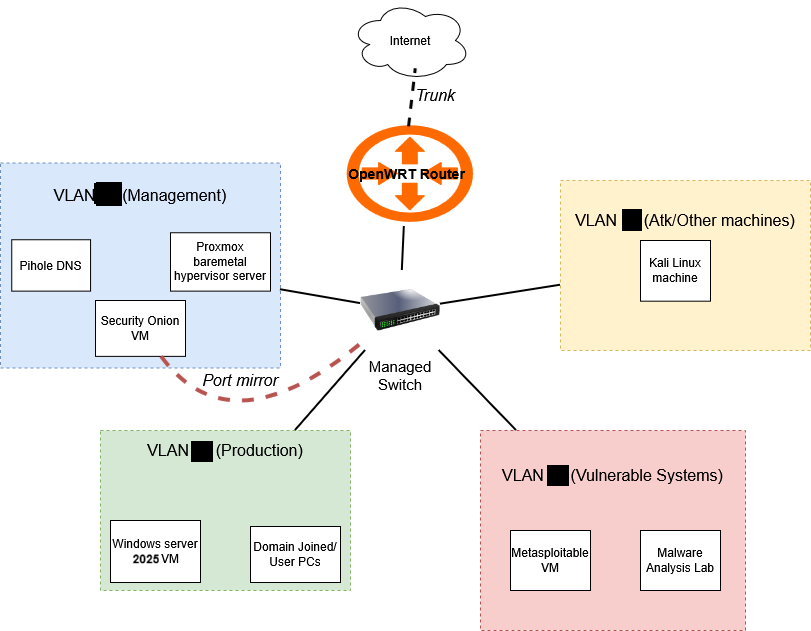
The environment is divided into four logical security zones.
| Network | Purpose |
| --- | --- |
| Management | Infrastructure administration, monitoring, and DNS |
| Production | Active Directory and domain-joined systems |
| Vulnerable | Intentionally vulnerable systems and malware-analysis environment |
| Attack | Offensive-security and penetration-testing systems |
Each network is assigned its own VLAN and subnet.
Traffic between VLANs is routed through an OpenWRT firewall, allowing inter-network communication to be explicitly controlled rather than permitting unrestricted lateral movement.
Addressing
| VLAN | Network | Gateway | Purpose |
| --- | --- | --- | --- |
| #1 | 192.168.X.0/24 | 192.168.X.1 | Management |
| #2 | 192.168.X.0/24 | 192.168.X.1 | Production |
| #3 | 192.168.X.0/24 | 192.168.X.1 | Vulnerable Lab |
| #4 | 192.168.X.0/24 | 192.168.X.1 | Attack Platform |
Actual addressing and VLAN identifiers are omitted from the public documentation.
---
Infrastructure
Proxmox Hypervisor
The core of the lab is a Dell PowerEdge R610 running Proxmox VE.
Resources
- 24 CPU threads
- 32 GB RAM
- 1.6 TB storage
- 4 network interfaces
The system hosts the majority of the lab's virtual infrastructure.
Administrative access is restricted to the management network, with remote management configured separately.
---
Network Infrastructure
Managed Switch
Hardware: HP 1810-8G
The switch provides:
- VLAN segmentation
- Traffic separation
- Port mirroring for network monitoring
Traffic is mirrored to the Security Onion sensor so network activity across the lab can be analyzed centrally.
Router / Firewall
Platform: OpenWRT
Hardware: Linksys EA6350 V3
The OpenWRT router provides:
- Inter-VLAN routing
- Firewall enforcement
- DHCP
- Backup DNS
- Internet access control
- Network-zone isolation
All primary security zones use restrictive forwarding and input policies, with communication explicitly permitted where required.
---
Network Segmentation
Management Network
The management network contains infrastructure that requires administrative or monitoring access.
Systems include:
- Proxmox management interface
- Pi-hole
- Security Onion
Administrative access is restricted to an authorized workstation.
Internet access is primarily used for system updates.
---
Production Network
The production VLAN simulates a small enterprise environment.
Systems include:
- Windows Server 2025 domain controller
- Domain-joined Windows systems
- Future Linux application servers
This network is used for Active Directory administration, Windows security testing, logging, and enterprise-style configuration.
---
Vulnerable Lab Network
The vulnerable network contains systems intentionally configured for security testing.
Systems include:
- Metasploitable
- Malware-analysis environment
The VLAN is isolated from the production and management environments.
Outbound access is restricted and enabled only when required for controlled testing.
---
Attack Network
The attack network contains systems used for offensive-security exercises.
Current systems include:
- Kali Linux
The network is isolated from the production environment while controlled access to vulnerable systems is permitted for testing.
---
Active Directory Environment
A Windows Server 2025 virtual machine provides Active Directory services for the production environment.
Roles
- Active Directory Domain Services
- DNS
- DHCP
Domain
lab.local
The domain controller is used to practice:
- User and group administration
- Domain-joined workstation management
- Group Policy
- Windows security configuration
- Centralized logging
- Authentication and access control
Windows event logs, Sysmon data, PowerShell activity, and endpoint telemetry are forwarded into the monitoring environment.
---
DNS Filtering
Pi-hole provides centralized DNS services and URL/domain filtering for the environment.
It is hosted inside the management network and serves DNS requests from permitted VLANs.
Pi-hole also contributes DNS-related telemetry to the monitoring environment.
---
Firewall Architecture
OpenWRT is configured around separate firewall zones corresponding to the lab's VLANs.
| Zone | Forward | Input | Output |
| --- | --- | --- | --- |
| WAN | REJECT | REJECT | ACCEPT |
| Management | REJECT | REJECT | ACCEPT |
| Production | REJECT | REJECT | ACCEPT |
| Vulnerable | REJECT | REJECT | ACCEPT |
| Attack | REJECT | REJECT | ACCEPT |
Inter-zone communication is denied by default.
Required traffic is selectively permitted for services such as:
- DHCP
- DNS
- Security monitoring
- Log forwarding
- Controlled security testing
Security Onion management and agent traffic is also selectively allowed between required hosts.
Exact management endpoints and service ports are omitted from this public documentation.
---
Security Monitoring
Security Onion
Security Onion provides the primary monitoring and detection platform for the lab.
Services
- Suricata
- Zeek
- Elasticsearch
- Kibana
- Elastic Agent / Elastic Defend
Traffic from the lab VLANs is mirrored to Security Onion through a dedicated SPAN/mirror connection.
This provides visibility into network traffic without placing the monitoring system directly in the forwarding path.
---
Network Detection
Current detection capabilities include:
- Suricata IDS
- Emerging Threats Open rules
- Security Onion YARA rules
- Zeek network telemetry
Custom detection rules are planned as the environment continues to develop.
---
Centralized Logging
Host telemetry is collected alongside network traffic.
| System | Logging / Telemetry |
| --- | --- |
| Proxmox | Processes, syslog, authentication logs |
| Windows Server | Event logs, Sysmon, PowerShell, endpoint telemetry |
| Security Onion | Sensor, system, and Security Onion service logs |
| Pi-hole | DNS and system telemetry |
Elastic agents are used where appropriate for centralized collection.
Retention
- PCAP: approximately 18 days
- Alert and log data: approximately 90 days
This allows historical investigation of security events and correlation between endpoint and network activity.
---
Access Control
Administrative interfaces are isolated from general-purpose networks.
Proxmox
- MFA enabled
- SSH key authentication
- Web interface restricted to the management network
Active Directory
- Administrative access restricted to an authorized administrative workstation
- Service-account usage is currently limited and planned for expansion
Network Infrastructure
- Router administration restricted to the management network
- SSH key authentication
- Administrative usernames omitted from public documentation
---
Security Testing Environment
The lab includes intentionally vulnerable systems so defensive controls can be tested against actual attack activity.
The attack platform can be used to generate traffic associated with:
- Enumeration
- Vulnerability scanning
- Exploitation
- Authentication attacks
- Network reconnaissance
- Post-exploitation activity
This traffic can then be investigated through Security Onion, Suricata, Zeek, Elastic telemetry, Windows logging, and packet captures.
This allows offensive testing and defensive monitoring to be performed within the same controlled environment.
---
Current Limitations
The homelab is built using personally available hardware, which creates several practical limitations:
- Limited compute resources restrict the number of VMs that can run concurrently
- The environment currently relies on a single physical virtualization server
- Available power, space, and hardware resources limit the size of the environment
These constraints also provide experience designing around limited resources rather than relying on enterprise-scale hardware.
---
Planned Improvements
Future work includes:
Resilience
- Implement automated VM backups
- Improve backup and recovery procedures
Detection Engineering
- Develop custom detection rules
- Expand the detection rule library
- Create detections for additional malware behavior
- Build automated attack simulations to validate detections
Identity and Windows Infrastructure
- Expand service-account usage
- Implement an internal certificate authority and PKI
- Expand the Active Directory environment for additional testing scenarios
Security Research
- Deploy honeypot services
- Expand malware-analysis capabilities
Infrastructure
- Deploy additional containerized services
- Experiment with Kubernetes-based workloads
---
Technologies Used
Virtualization
- Proxmox VE
Networking
- OpenWRT
- VLAN segmentation
- Inter-VLAN routing
- Firewall zones
- Port mirroring / SPAN
- DHCP
- DNS
Windows Infrastructure
- Windows Server 2025
- Active Directory Domain Services
- Group Policy
- Sysmon
- PowerShell logging
Defensive Security
- Security Onion
- Suricata
- Zeek
- YARA
- Elasticsearch
- Kibana
- Elastic Agent
- Elastic Defend
Offensive / Testing
- Kali Linux
- Metasploitable
- Dedicated malware-analysis environment
Infrastructure Security
- MFA
- SSH key authentication
- Network segmentation
- Restricted management access
- Centralized logging
---
Useful Commands
Proxmox
# List virtual machines
qm list

# Start a VM
qm start <vmid>

# Stop a VM
qm stop <vmid>
Security Onion
# Check service status
sudo so-status

# Restart Security Onion services
sudo so-restart

# Update detection rules
sudo rule-update
Elastic Agent
Windows
"C:\Program Files\Elastic\Agent\elastic-agent.exe" status
Linux
sudo elastic-agent status
References
- Proxmox VE Documentation
- OpenWRT Documentation
- Security Onion Documentation
- Wazuh Documentation